The Future of AI Integration Using MCP Serves & Claude
Mar 23, 2026
The Business Superpower You Need Right Now
How connecting your tools to Claude Desktop is transforming the way modern businesses operate, decide, and grow.
What is an MCP Server?
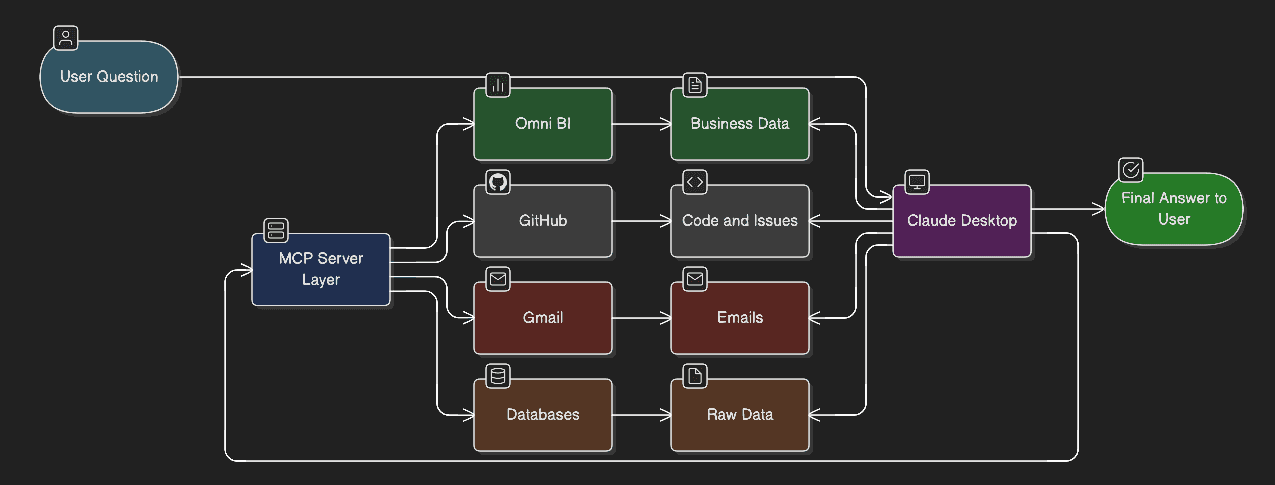
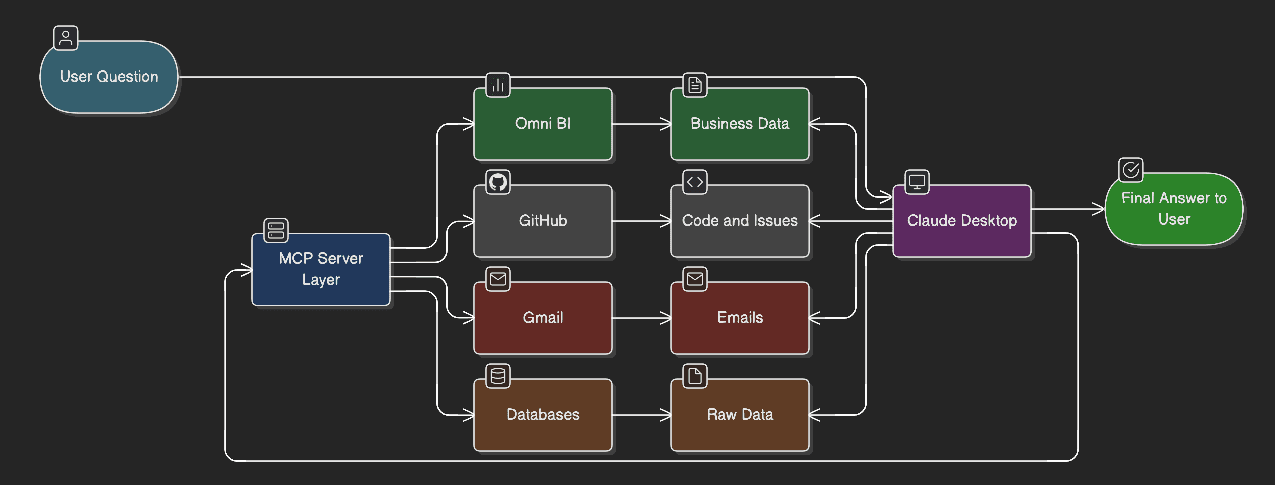
Imagine giving your AI assistant a set of keys — keys to your database, your inbox, your code repository, your analytics dashboard. That is exactly what an MCP server does.
MCP stands for Model Context Protocol. It is an open standard developed by Anthropic that allows AI models like Claude to securely connect to external tools, data sources, and services in real time. Instead of copy-pasting data into a chat window and hoping the AI understands the context, MCP creates a live, structured bridge between Claude and the systems your business already uses.
In plain terms: MCP servers turn Claude from a smart chatbot into an intelligent operator that can actually see, read, and act within your business ecosystem.
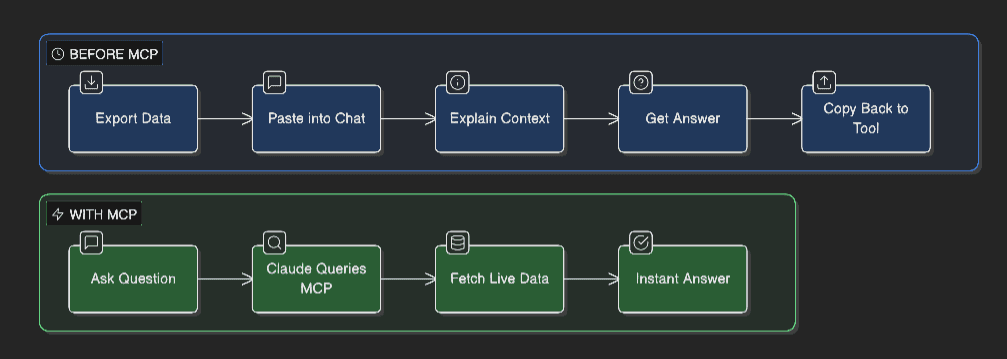
Before MCP, working with AI on real business tasks looked like this:
Export data from your tool manually
Paste it into the chat
Describe the context from scratch
Copy the AI's output back into your tool
With MCP, all of that disappears. Claude connects directly, queries what it needs, and delivers answers grounded in your actual, live data.
How Does It Work? (Simply Explained)
Think of Claude Desktop as the brain and MCP servers as its nervous system. Each MCP server is a connector that speaks a common language — the Model Context Protocol — so Claude knows exactly how to ask for data and how to interpret the response.
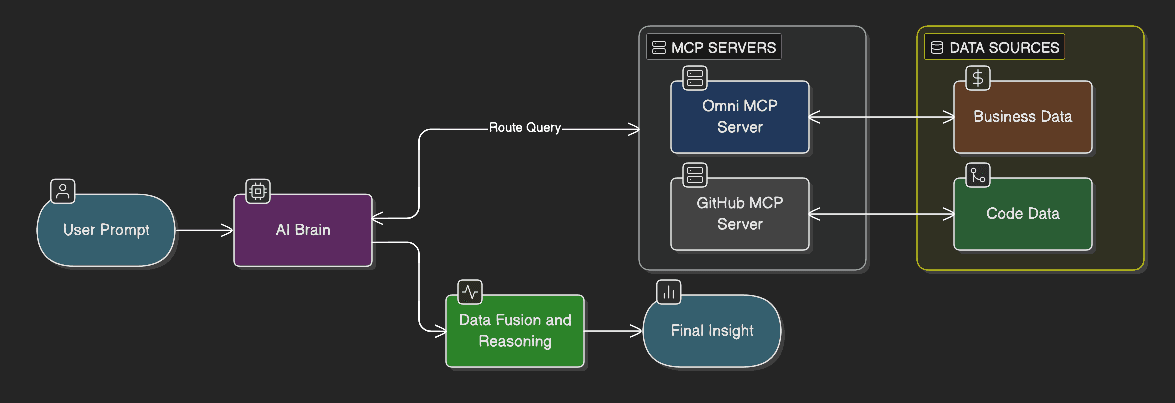
When you type a question in Claude Desktop like “What were our top 5 performing GitHub repositories last month?” or “Summarize the support tickets in my inbox,” Claude:
Identifies which MCP server (tool) can answer this
Sends a structured query to that server
Receives live, real data in response
Synthesizes it into a clear, intelligent answer for you
No exports. No manual input. No context loss. Just answers.
Connecting Omni MCP to Claude Desktop
Omni is a modern business intelligence platform that lets teams explore, query, and understand their data without needing to be data scientists. When you connect Omni to Claude via MCP, you essentially give Claude a direct line into your company’s data universe.
Step-by-Step: Setting Up Omni MCP
01 | Install Claude Desktop Download and install Claude Desktop from claude.ai/download on your Mac or Windows machine. |
02 | Open Claude Desktop Settings Launch Claude Desktop, click your profile icon in the top-right corner, and select “Settings” from the dropdown menu. |
03 | Navigate to Developer / Integrations In Settings, find the “Developer” or “Integrations” tab. This is where all MCP server connections are managed. |
04 | Add the Omni MCP Server Click “Add MCP Server.” Enter the Omni MCP server URL provided in your Omni workspace settings. It will look like: https://mcp.omni.co/sse |
05 | Authenticate with Your Omni API Key Omni will prompt you for an API key. Log in to your Omni account, go to Settings > API Keys, generate a new key, and paste it into Claude Desktop. |
06 | Select Your Data Model Once connected, Claude will automatically call pickModel to discover which Omni data models you have access to. Select the model relevant to your business queries. |
07 | Start Asking Business Questions You’re live! Ask Claude things like: “What was our revenue by region last quarter?” or “Show me our top 10 customers by order value.” Claude does the rest. |
Pro Tip: You can ask Omni questions in plain English. No SQL, no dashboards, no waiting for the data team. Claude translates your question into a query, runs it, and gives you the answer in seconds.
Connecting GitHub MCP to Claude Desktop
GitHub is where your code lives — and for most businesses, that means it’s also where your product roadmap, engineering velocity, and team collaboration live. Connecting GitHub to Claude gives you an intelligent co-pilot across your entire development workflow.
Step-by-Step: Setting Up GitHub MCP
01 | Install Claude Desktop If you haven’t already, download Claude Desktop from claude.ai/download. |
02 | Open Settings > Developer Navigate to Settings and open the Developer or Integrations tab in Claude Desktop. |
03 | Add the GitHub MCP Server Click “Add MCP Server” and enter the official GitHub MCP server endpoint. GitHub’s MCP server is available via their official MCP integration or through Anthropic’s approved connector list. |
04 | Authorize with GitHub OAuth Claude Desktop will redirect you to GitHub’s authorization page. Log in to GitHub and grant the required permissions (typically: read access to repos, issues, and pull requests). |
05 | Select Your Organization or Repositories You can scope access to specific repositories or allow Claude to query across your entire organization. Start narrow and expand as needed. |
06 | Test the Connection Ask Claude: “List our open issues in the main repo” or “What pull requests are waiting for review?” If you see real data, you’re connected. |
07 | Go Beyond Queries — Take Action With the right permissions, Claude can do more than read. It can create issues, comment on PRs, search code, and even help triage your backlog — all from a single conversation. |
Pro Tip: Combine GitHub + Omni in one Claude session. Ask: “Compare our sprint velocity last month to our revenue performance.” Claude queries both MCP servers and synthesizes a unified answer.
Why This Matters for Your Business
Let’s cut through the hype and talk about what actually changes when you connect MCP servers to Claude. The impact is felt across three dimensions: speed, intelligence, and competitive edge.
1. Decisions Happen in Minutes, Not Days
1. | Instant Data Access Executives and managers no longer need to wait for the data team to pull a report. With Omni MCP, any authorized user can ask Claude a business question and get a data-backed answer in under 60 seconds. |
Example: A sales director asks, “Which customers haven’t placed an order in 90 days but were top-10 buyers six months ago?” Claude queries Omni, surfaces the list, and even drafts a re-engagement email — all in one conversation.
2. Engineering Teams Move Faster
2. | Intelligent Dev Operations With GitHub MCP, Claude becomes your engineering team’s smartest assistant. It can triage issues, summarize PR changes, flag blockers, and help onboard new developers by answering questions about your actual codebase. |
Example: A new developer asks, “What are the most common types of bugs we’ve fixed in the authentication module over the last 6 months?” Claude searches GitHub issues and returns a structured summary — saving hours of manual review.
3. Every Employee Becomes Data-Literate
3. | Democratized Intelligence One of the biggest bottlenecks in business is the gap between data and the people who need it. Most employees can’t write SQL. Most managers can’t navigate BI tools. Claude with Omni MCP removes that barrier entirely. |
When a marketing manager can ask “Which campaign drove the most revenue last quarter?” and get a real answer instantly, the entire organization becomes smarter and more aligned.
4. Fewer Tools, Less Switching
4. | Unified Workflow Hub Today’s business professionals switch between 10+ apps a day. Every context switch costs focus and time. With Claude as the central interface — connected to Omni, GitHub, Gmail, Calendar, and more via MCP — one conversation can span your entire business stack. |
Example: “Check our GitHub backlog, cross-reference with Q2 revenue projections in Omni, and draft a prioritization memo.” One prompt. Three tools. Zero tab switching.
5. Competitive Advantage That Compounds
5. | Strategic Edge Companies that deploy AI effectively don’t just move faster today — they build institutional intelligence that compounds over time. Every question answered, every workflow automated, every decision accelerated creates a growing gap between you and competitors still doing things manually. |
MCP is not just a productivity tool. It is infrastructure for intelligent business operations. The companies that adopt it early will be the ones that set the pace in their industries.
Real-World Business Scenarios
Scenario 1: The Morning Briefing
Every morning, a CEO asks Claude: “Give me my business briefing.” Claude checks GitHub for overnight commits and open incidents, queries Omni for yesterday’s key metrics, and scans Gmail for urgent emails. In 30 seconds, the CEO has a complete picture.
Scenario 2: The Sales Review
A VP of Sales needs to prep for a board meeting. She asks Claude to pull revenue by product line, flag deals that stalled in Q3, and compare performance against last year. Omni MCP delivers all of it. Claude formats it into a board-ready summary.
Scenario 3: The Developer Handoff
A senior engineer is going on leave and asks Claude to create a handoff document. Claude pulls all open issues assigned to her from GitHub, summarizes recent PR activity, and drafts a structured handoff doc — in minutes.
Scenario 4: The Customer Escalation
A customer success manager gets an urgent escalation. She asks Claude to check if there are any related GitHub bugs, look up the customer’s recent order history in Omni, and draft a response email. Claude does all three simultaneously.
Getting Started Today
The barrier to entry is lower than you think. Here is what you need:
Claude Desktop (free to download at claude.ai/download)
An Omni account with API access
A GitHub account with appropriate repository permissions
15 minutes to set up each MCP server
That’s it. No engineers required for the initial setup. No lengthy procurement cycle. No months-long implementation. You can be operational this afternoon.
The question isn’t whether AI will transform your business. It already is. The question is whether you’ll be the one driving it, or watching from the sidelines.
Conclusion
MCP servers represent a fundamental shift in how AI integrates with business operations. By connecting Claude to Omni and GitHub, you are not just automating tasks — you are building an intelligent layer on top of your entire business stack.
Your data becomes accessible. Your engineering processes become smarter. Your decisions become faster. And your team — from the intern to the CEO — gains a powerful, always-available co-pilot that understands your business context.
The future of work is not humans vs. AI. It is humans, supercharged by AI — with MCP servers as the connective tissue that makes it all work seamlessly.
Start your MCP journey today.